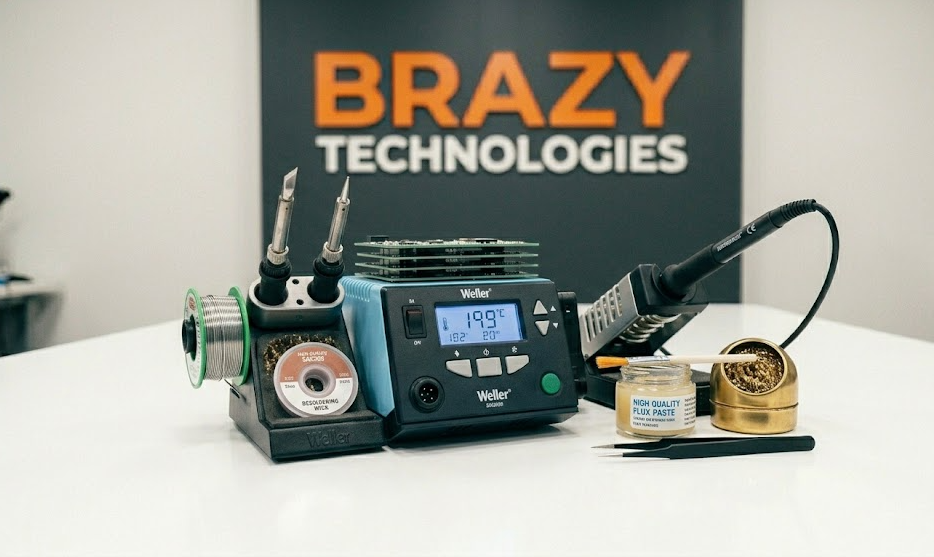
Soldering is the foundation of electronics repair. Whether you're replacing a capacitor, fixing a broken wire, or building a project, good soldering skills are essential.
What You'll Learn
- What soldering actually is (and how it works)
- Choosing the right soldering equipment
- Proper soldering technique
- Common mistakes and how to avoid them
- How to desolder components
- Practice exercises to build skill
What is Soldering?
Soldering is NOT welding. Welding melts the base metals together. Soldering uses a filler metal (solder) with a lower melting point to create an electrical and mechanical connection between components.
The solder melts around 370°F (188°C) - hot enough to melt solder but not hot enough to damage most components.
Essential Tools You Need
Beginner Kit ($30-50):
- Soldering iron: 40-60W with temperature control (recommend: Pinecil, TS100, or Hakko FX-600)
- Solder: 63/37 or 60/40 rosin core (0.6mm or 0.8mm diameter)
- Brass sponge or damp sponge (cleaning tip)
- Solder sucker or desoldering wick (for removing solder)
- Helping hands (holds your work)
- Tip tinner/cleaner
Nice to Have:
- Flux pen (makes soldering MUCH easier)
- Multimeter (test connections)
- Magnifying lamp or microscope
- Fume extractor (health and safety)
⚠️ IMPORTANT: Avoid "lead-free" solder as a beginner. It requires higher temperatures and is harder to work with. 63/37 leaded solder is best for learning.
Choosing Your First Soldering Iron
What to look for:
- Temperature control (not just wattage)
- Interchangeable tips
- Stand with sponge/brass wool
- Good reviews from repair communities
Recommended budget options:
- Pinecil ($40) - USB-C powered, excellent
- KSGER T12 ($50-70) - Station style, great value
- Hakko FX-600 ($80) - Reliable, simple
Avoid: $10-20 hardware store irons. They have poor temperature control and will frustrate you.
Soldering Safety
Before you start:
- Work in a well-ventilated area (fumes are bad for you)
- Use a fume extractor or small fan
- Never touch the hot tip (obvious but important!)
- The stand is hot too - don't touch
- Wash hands after soldering (lead exposure)
- Don't solder while tired or distracted
Proper Tip Care (Most Important!)
Your soldering iron tip will last years with proper care:
1. Before first use: Tin the tip (melt solder onto it)
2. After each joint: Wipe tip on brass sponge
3. Before turning off: Add fresh solder to tip (protects from oxidation)
4. Never: Leave iron on without solder on tip
5. Never: Use abrasive materials (sandpaper, files)
A black, non-wetting tip is dead. Replace it or use tip tinner to revive it.
Soldering Technique: Step by Step
The "Heat the joint, not the solder" rule:
1. Clean and tin your tip
2. Heat both the pad AND the component lead simultaneously (1-2 seconds)
3. Feed solder into the joint (not onto the iron tip)
4. Watch the solder flow - it should wet both surfaces
5. Remove solder, then remove iron
6. Joint should be shiny and concave
Good joint = Shiny, smooth, volcano shape
Bad joint = Dull, balled up, spiky, or incomplete
Practice Exercise #1: Soldering Wires
Best first practice. Cut an old USB cable:
1. Strip 1/4 inch of insulation from both ends of two wires
2. Twist strands together tightly
3. Apply flux to both wires
4. Heat one wire, feed solder until it's coated (tinning)
5. Repeat for second wire
6. Place wires together, heat both, add small amount of solder
7. Let cool without moving
Result should be a smooth, shiny connection that doesn't break when pulled.
Practice Exercise #2: Through-Hole Components
Get a practice PCB kit from Ali Express/Amazon ($5-10) or nearby electronics parts shop or use an old broken board:
1. Insert resistor leads through holes
2. Bend leads slightly to hold component
3. Heat pad and lead together (2 seconds)
4. Feed solder until it flows through hole
5. Remove iron, let cool (2 seconds)
6. Clip excess leads flush
Perfect joint: Concave fillet, shiny, completely covers pad.
Practice Exercise #3: Desoldering
Learning to remove components is equally important:
Using a solder sucker:
1. Heat the joint until solder melts
2. Place sucker tip next to iron (or over joint)
3. Press button to suck molten solder
4. Repeat until hole is clear
Using desoldering wick (braid):
1. Place wick over the joint
2. Press hot iron on top of wick
3. Wick will absorb molten solder
4. Remove when wick is saturated
Common Mistakes and Solutions
Mistake: Solder balls up and won't stick ?
- Cause: Dirty tip, no flux, or not hot enough
- Fix: Clean tip, add flux, increase temperature
Mistake: Joint looks dull and grainy ?
- Cause: Joint moved while cooling
- Fix: Reheat until solder flows, hold still while cooling
Mistake: Solder bridge between adjacent pins ?
- Cause: Too much solder or dirty tip
- Fix: Use solder wick to remove excess
Mistake: Component lifted off board
- Cause: Too much heat for too long
- Fix: Use lower temp, work faster next time
Mistake: Burned board or lifted pad
- Cause: Iron too hot or contact too long
- Fix: Lower temperature, add flux, be quicker
Recommended Temperatures
- Small components (SMD): 550-600°F (290-315°C)
- Through-hole components: 600-650°F (315-345°C)
- Large ground planes: 650-700°F (345-370°C)
- Desoldering: 600-650°F (315-345°C)
Start at lower temperature. Increase only if solder doesn't flow within 3-4 seconds.
When to Use Flux
Use flux ALWAYS. Even with rosin-core solder, extra flux helps:
- Every joint (apply small amount with pen or syringe)
- Especially on old boards (oxidation prevents flow)
- When desoldering (helps molten solder move)
- Surface mount components (essential)
Flux is cheating? No, flux is the secret to professional results.
Practice Schedule
Week 1: Practice tinning wires and making butt joints (20-30 joints)
Week 2: Through-hole soldering on practice board (50-100 joints)
Week 3: Desoldering components (remove and replace 20 components)
Week 4: Repair a simple device (bad headphone jack, broken charger cable)
After 4 weeks of daily practice, you'll be ready for most common repairs.
Real-World First Projects
Ready to try real repairs? Start with:
- Replace swollen capacitors on a computer motherboard
- Fix broken headphone jack (3.5mm connector)
- Repair Christmas lights (solder broken wires)
- Replace battery contacts in remote controls
- Fix loose USB port on a keyboard or mouse
These are low-risk, high-success repairs that build confidence.
When to Get Professional Help
Replace the device if:
- Board has burnt holes or missing pads
- Multiple layers of board are damaged
- You've already tried and made it worse
- Safety-critical device (power supplies, medical equipment)
Soldering is a skill that improves with practice. Your first 100 joints will be ugly. Your next 100 will be better. After 1000 joints, you'll be confident.
🔐 Want to master advanced soldering?
The full soldering masterclass covers:
- Surface mount (SMD) soldering techniques
- Microsoldering for phone and laptop repair
- Using a hot air station
- Advanced flux types and applications
- Professional rework techniques
👉 Join the waitlist for early access and certification program.